
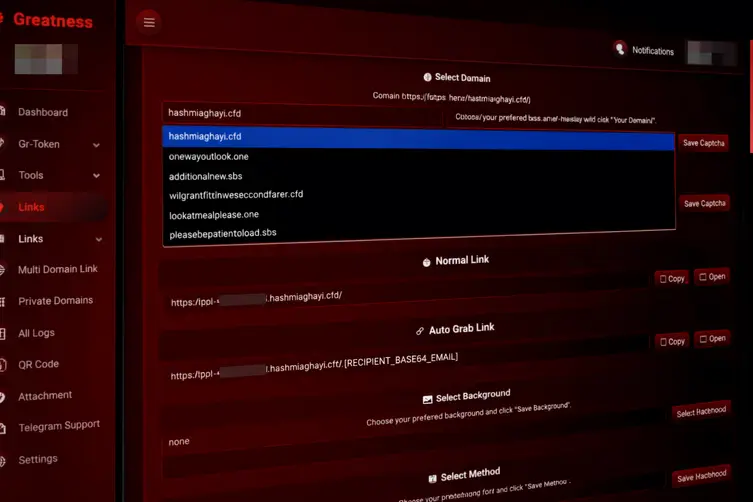
What this upgraded PhaaS actually does
Meet the upgraded crimeware toolkit that now plays in the big leagues: it mixes classic credential grabs with sneaky modern tricks. The platform packs adversary‑in‑the‑middle proxies, device code phishing that abuses OAuth flows, and OAuth consent abuses — all manageable from the same operator dashboard. Targets include cloud mail and productivity services like Microsoft 365, Google Workspace, iCloud, and other popular providers.
It’s sold as a subscription service on a messaging channel, complete with a bot for signups and license management. Price tags have climbed — operators are asking several hundred dollars per month now — and buyers get a turnkey control panel with campaign stats, domain setup, CAPTCHA options, and a library of ready‑made lures so you don’t have to be a web designer to phish.
Operators even boast privacy features, saying captured cookies are stored hashed and only retrievable by the purchaser’s account credentials. Whether that’s comforting or worrying depends on which side of the law you’re on.
How the scams work, what happens after, and how to fight back
These campaigns aren’t one‑page trickery anymore — they’re little ecosystems. A victim clicking a malicious link is routed through a multi‑stage redirect chain that performs anti‑analysis checks, user‑agent fingerprinting, CAPTCHA gating, and then drops the victim either into an AiTM proxy or into a legitimate device‑code flow. The device‑code route is especially nasty because the login page the user sees is the real provider page — the attacker just convinces the user to enter a short code and grabs the token behind the scenes, enabling token theft without an obvious fake login screen.
- Common lure templates include voicemail, document sharing, one‑drive or cloud access pages, QR prompts, media players, and fake system dialogs.
- Phishing emails may intentionally abuse safe‑sender/exclusion rules so they land in inboxes even when SPF/DKIM/DMARC fail — especially when the recipient is a legitimate customer of the impersonated vendor.
Once attackers have tokens, they move fast. Examples of post‑compromise actions observed in similar campaigns include:
- Replaying stolen tokens from proxy infrastructure within minutes to enumerate mailbox and collaboration resources via APIs.
- Registering devices to mint longer‑lived refresh tokens for persistence.
- Waiting hours before creating inbox rules or exporting data to avoid immediate detection.
So how do you stop this circus? There’s no single magic button, but sensible controls make these attacks much harder and less profitable:
- Block or restrict the OAuth device authorization flow at the tenant level unless it’s explicitly required. Treat any permitted usage as a privilege and audit it regularly.
- Adopt phishing‑resistant MFA (hardware keys, FIDO2, etc.) wherever possible instead of SMS or app codes that are easier to bypass.
- Tighten email allow‑lists and safe‑sender settings, and treat vendor breach notifications as a cue to review exclusions and routing rules.
- Train staff to be suspicious of unexpected codes or prompts that ask them to enter short verification codes on unfamiliar pages.
- Monitor for unusual token activity: rapid API calls, new registered devices, and delayed mailbox rule creations are red flags.
In short: attackers keep refining their toolkits, turning phishing into a one‑stop shop with easy‑to‑use dashboards and ready‑made lures. The defenses are also straightforward — tighten the flows you don’t need, use stronger MFA, and treat vendor incidents like the fire drills they are. Keep your teams paranoid and your policies tight, and you’ll make these services a lot less fun for criminals.